DATEV Guide
Introduction
efsta offers integrations with DATEV to support different business and accounting requirements. Depending on your setup and processes, different DATEV services may be suitable. As those requirements can vary, your tax advisor is best placed to advise which DATEV service is the right choice for you. On efsta side, the archive feature is mandatory. The same applies on DATEV side, as the booking data is stored directly in it.
There are currently two services available:
-
DATEV MeinFiskal (Pilot)
The DATEV MeinFiskal Export enables you to generate DSFinV‑K–compliant exports for your cash registers and automatically transfer this data to DATEV MeinFiskal. Once transferred, your data is available in DATEV MeinFiskal and can be further processed in DATEV applications. This solution is designed to support German fiscal cash-register compliance in a secure and automated way.infoDATEV MeinFiskal is currently in Pilot phase. Please contact your efsta partner manager if you would like to participate.
-
DATEV Invoice Data Service 1.0
With the DATEV interface from efsta you can automatically convert transaction data from your online cash registers into DATEV posting data, which is done via the interface "Rechnungsdatenservice 1.0" provided by DATEV. On efsta side, the archive feature is mandatory for this, and the same applies to the online cash ledger on DATEV side, as the booking data is stored directly in it.
The automatic transfer runs daily at 03:00 UTC.
Choosing the Right DATEV Service
DATEV offers different services depending on your use case.
DATEV MeinFiskal
- Cash register–centric solution
- Focus on DSFinV‑K–compliant fiscal data
- Ideal for audits and cash-register compliance
More information: DATEV MeinFiskal | Die offene Plattform für die ordnungsgemäße Kassenführung
DATEV Invoice Data Service 1.0
- Invoice- and document-centric solution
- Works with DATEV Unternehmen online
- Focus on invoice data and booking proposals
Which one should you use?
Tax advisors can assess which service they choose or know which service is being used. If your main requirement is cash-register fiscal compliance, you may choose DATEV MeinFiskal. If your focus is invoice processing and document workflows, you may choose Invoice Data Service 1.0
Only one of these services can be active at a time inside efsta in order to avoid duplicate data in DATEV.
DATEV MeinFiskal (Pilot)
Solution Overview
What is the DATEV MeinFiskal Export? The DATEV MeinFiskal Export enables efsta to:
- Generate DSFinV‑K–compliant exports for your cash registers
- Automatically transfer this data to DATEV MeinFiskal
Once transferred, your data is available in DATEV MeinFiskal and can be further processed in DATEV applications. This solution is designed to support German fiscal cash-register compliance in a secure and automated way.
What efsta Does and What DATEV Does:
| efsta | DATEV MeinFiskal |
|---|---|
| - Collects and validates cash-register data - Generates DSFinV‑K exports - Transfers the data automatically to DATEV MeinFiskal | - Stores cash-register data in a fiscally compliant archive - Makes data available for audits and further processing in DATEV |
Accounts & Access
DATEV Account vs. MeinFiskal User Account
The separation is only for authentication. This does not mean you need duplicate accounting setups.
| DATEV Account | MeinFiskal User Account |
|---|---|
| - Used for DATEV Unternehmen online and other DATEV services - Can manage multiple companies | - Separate login required for MeinFiskal - Used for Kassenarchiv and Kassenmeldung - DATEV SmartCard or SmartLogin cannot be used here |
In DATEV, each company is identified by an Ordnungsbegriff, which consists of:
- Beraternummer (advisor number)
- Mandantennummer (company number)
- One Beraternummer can manage multiple Mandanten (companies)
- Each cash-register folder in MeinFiskal can only be linked to one Ordnungsbegriff
If you operate more than one legal entity:
- Each company requires its own MeinFiskal setup
- One DATEV user account can still manage multiple companies
Requirements Before You Start
To use the efsta–DATEV MeinFiskal integration, you need:
- An active DATEV MeinFiskal contract
- Sufficient MeinFiskal quota for all active cash registers
- Completed MeinFiskal onboarding on the DATEV side
efsta does not create or bill MeinFiskal accounts. Registration and contract management are handled by DATEV or your tax advisor.
Onboarding & Setup
The DATEV MeinFiskal feature must first be activated for your company in efsta. Once activated, a MeinFiskal tab becomes visible in the efsta portal.
Connecting efsta with DATEV MeinFiskal
Step 1: Feature Activation
- To request the activation of DATEV MeinFiskal, please contact your partner manager.
- To participate to the Pilot phase, a pilot agreement is required.
Step 2: Login & Authorization
- Open the efsta Portal and go to your Company Settings
- Navigate to the "MeinFiskal" tab
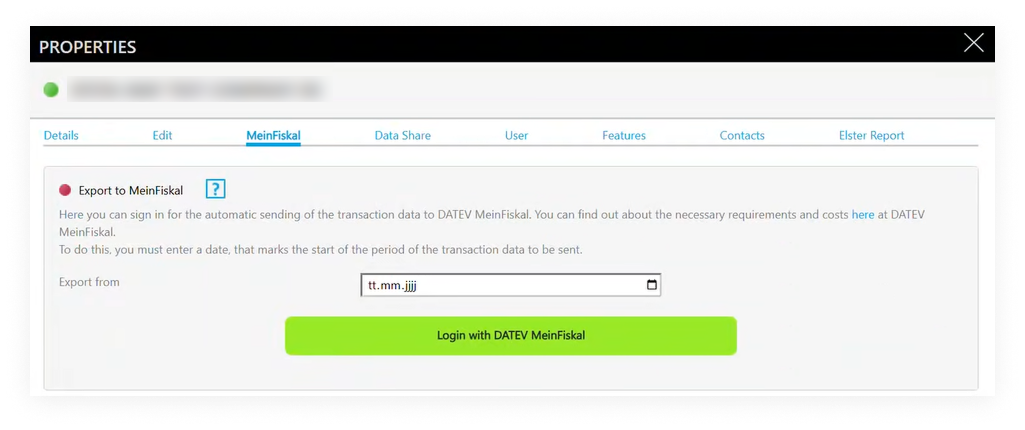
- Select the export start date
- currently from the start of the current year
- Click "Login with DATEV MeinFiskal" and log in using your MeinFiskal credentials
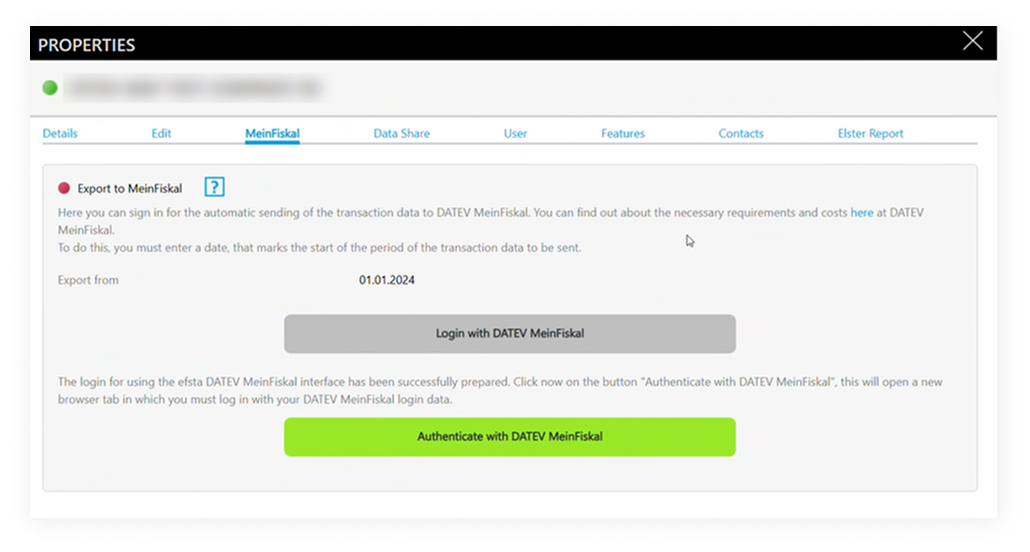
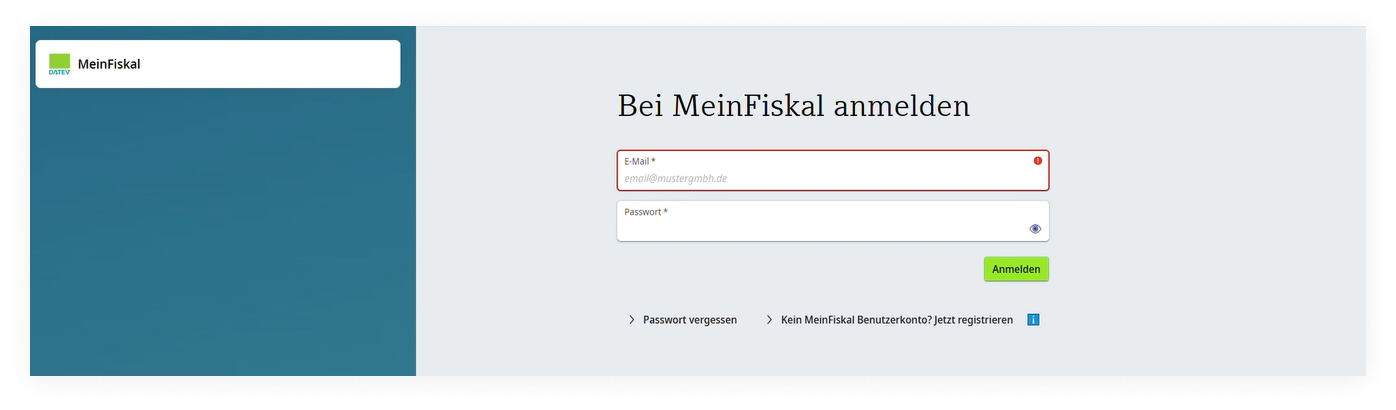
- Authorize efsta to transfer data
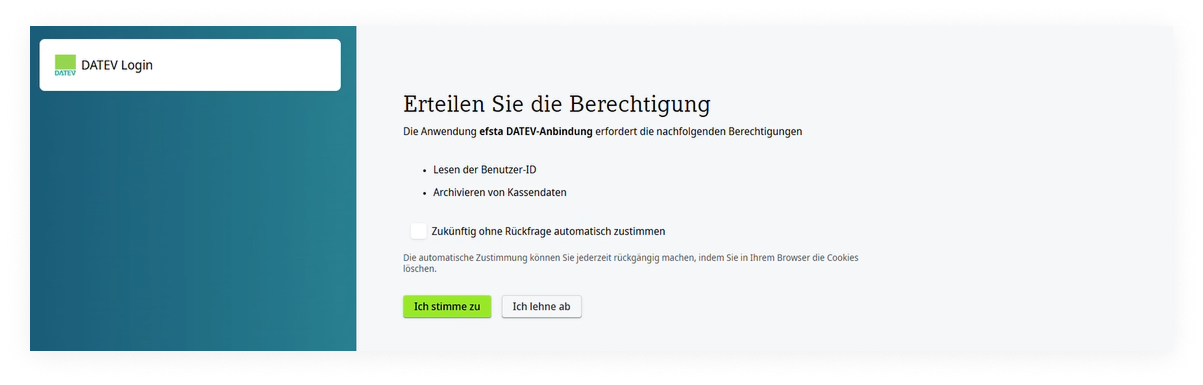
- Once connected, automatic exports start the following day
- the status is shown in the efsta Portal
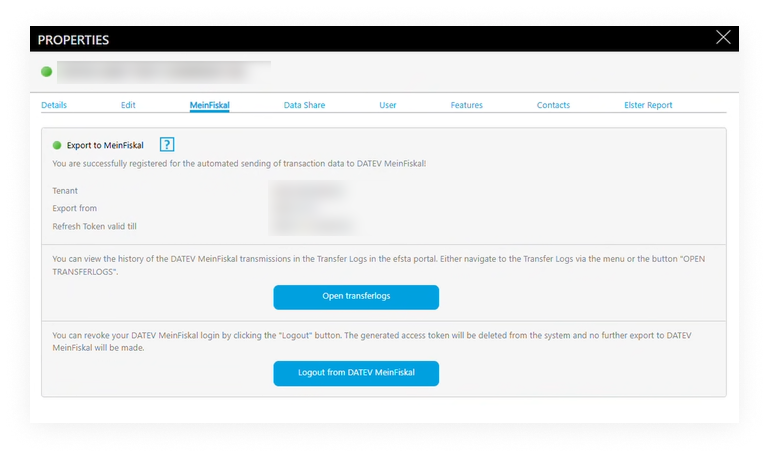
- the status is shown in the efsta Portal
Disconnecting the Integration
If you log out from MeinFiskal in the portal:
- Data transfers stop immediately
- Already transferred data remains in DATEV
To fully deactivate the service (including billing aspects), please contact your efsta partner or support.
Export & Transfer Process
| Daily Exports | Data Validation |
|---|---|
| - Exports run once per day (early morning, 03:00 UTC) - A DSFinV‑K export is generated for each active cash register - Data is packaged and securely transferred to DATEV MeinFiskal | Before sending: - Totals and structure are validated - Only compliant data is transferred |
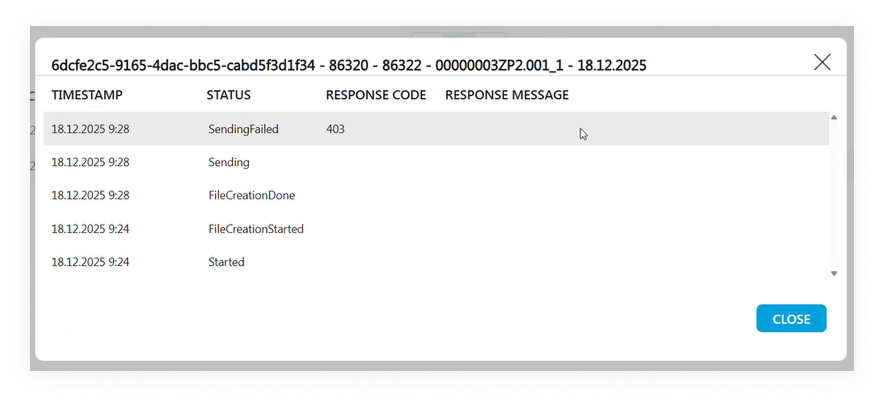
If DATEV detects issues, the transfer is rejected and shown in the efsta portal.
Transfer Logs & Transparency
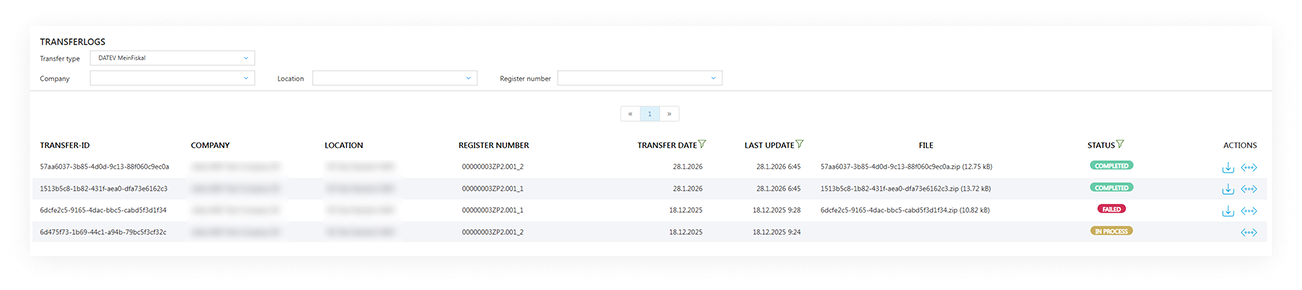
In the efsta portal, you can view all DATEV MeinFiskal Transfer Logs, giving you and your tax advisor full transparency over what has been transferred.
You can:
- Check the transfer status
- Filter by status, company, register, date
- Download export files
Common Issues & What to Do
Some typical messages you may see:
No quota available
Your MeinFiskal quota is used up
Action: Purchase additional quota in DATEV MeinFiskal
No MeinFiskal contract found
Onboarding not completed on DATEV side
Action: Complete MeinFiskal setup in DATEV
Folder deactivated
A register folder was deactivated in MeinFiskal
Action: Reactivate the folder in DATEV MeinFiskal (deactivated folders in MeinFiskal block data transfers)
- Large historical exports may take longer.
- If an error persists or is unclear, please contact efsta support.
Summary
With the efsta–DATEV MeinFiskal integration, you benefit from:
- Automated, daily DSFinV‑K exports
- Secure transfer to DATEV MeinFiskal
- Transparency through transfer logs
- Reduced manual effort and audit readiness
If you have questions or need support, your efsta contact or tax advisor will be happy to help.
DATEV Invoice Data Service 1.0
The efsta DATEV interface automatically converts transaction data from online cash registers into DATEV posting data. It uses the DATEV interface Rechnungsdatenservice 1.0.
Registering the efsta DATEV Interface
Registering the efsta DATEV interface involves activating the DATEV Rechnungsdatenservice within the efsta Portal, completing the required DATEV setup, and authenticating with your DATEV credentials to enable automated data transfer.
Step 1: Ordering & Activation
- Open the efsta Portal and go to your Company Settings
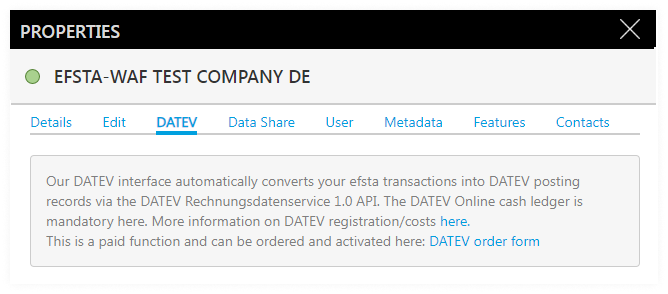
- Navigate to the "DATEV" tab and review the requirements for DATEV Rechnungsdatenservice 1.0
- Submit the order form to activate the interface
- Wait for the activation confirmation and status update in the Portal.
- Create a separate DATEV cash ledger for each efsta register using the format [TL]/[TT] (e.g.: 1/001).
- Pricing details are available in the order form or from your partner manager
- The activation is binding and may take several days
- DATEV cash ledger are required to ensure correct booking data transfer
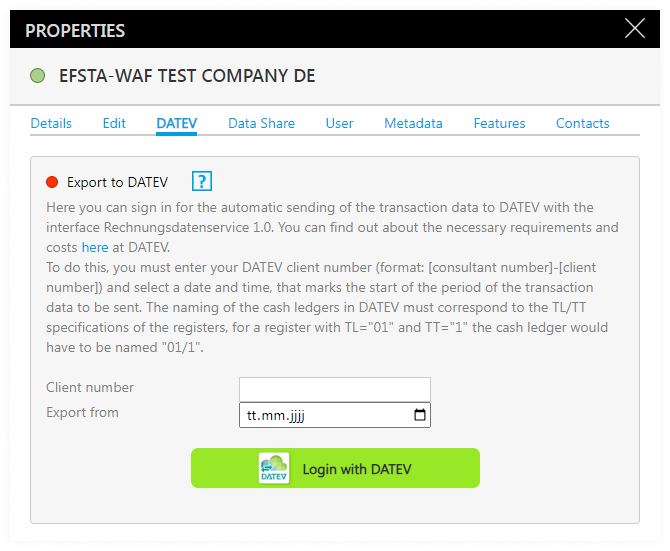
Step 2: Login
- Enter your DATEV tenant number
- consultant- and client number, separated by a hyphen.
- Enter the date in the "Export from" field. This date defines the start of the data period to be transferred.
- for example, entering 01.01.2024 sends all data from that date onward.
- Click "Login with DATEV"
Step 3: Authentication
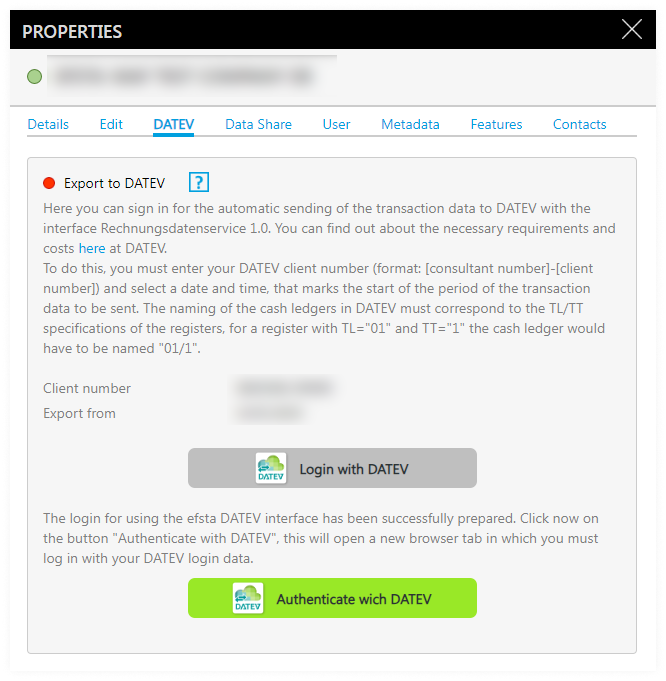
- Click "Authenticate with DATEV".
- Log in with your DATEV credentials in the new browser window.
- Review and confirm all requested authorizations.
Step 4: Finalization
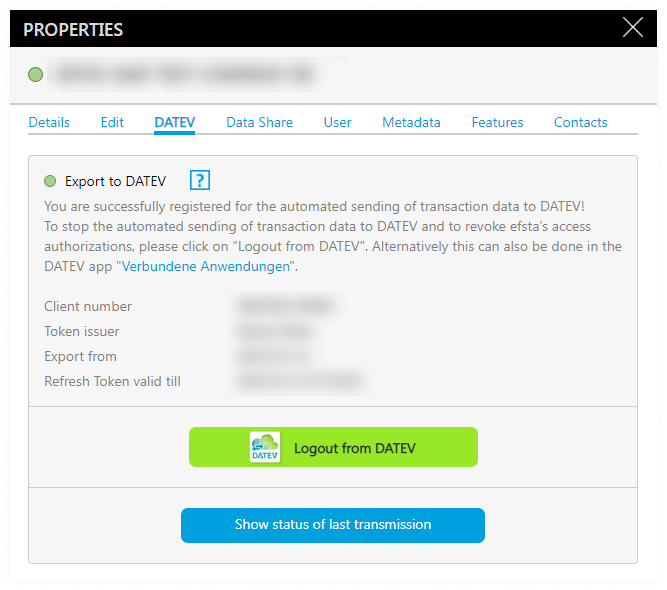
- Return to the efsta Portal and wait for the automatic refresh.
- Verify the green status icon (
 ) next to "Export to DATEV", indicating a successful connection.
 - Check authorization details and token validity if needed.
DATEV Service Management
Once authorized, the connection status and transmission activity can be monitored directly in the Portal, and the service can be managed or deactivated as needed.
Checking Transmission Status
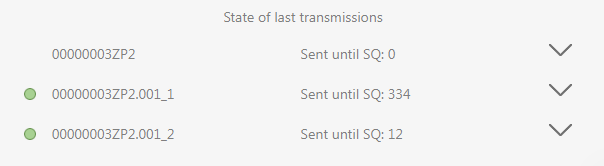
- Click "Show status of last transmissions".

- Review the register number, transmission result, and last processed sequence number.
- Click a register number to open the detailed transmission log.
- Click a register number to open the detailed transmission log.
- Contact efsta support if errors occur.
Unsubscribing from Automatic Transmission
- Click "Logout from DATEV" to immediately stop daily transfers.
- The efsta service fee continues until the feature is fully revoked.

- The efsta service fee continues until the feature is fully revoked.
- To fully revoke the feature, please contact your partner manager.
Enduser Instructions
Here you can find a guide specifically for endusers to understand which DATEV service fits their use case and who typically decides. It also outlines the onboarding steps they will see when DATEV services are used together with their POS/solution provider and the efsta ecosystem, available in english or german.