Implementation KassenSichV
The "KassensichV" is a regulation issued by the Federal Ministry of Finance (BMF). A technical secure element (TSE) is needed, which has to be certified by a fiscal authority institute. At the moment there are a few certified TSE on the market.
You can find an FAQ and glossary from BMF in the BMF FAQ on fiscal receipt obligations (status June 2024)
The further use of the POS system without a TSE after 01.01.2020 is forbidden.
The only exceptions (status June 2024) are:
- Ticket vending machines and ticket printers
- Pay stations and parking ticket machines for parking space management and charging points for electric or hybrid vehicles
- Electronic accounting programs
- Vending machines for goods and services
- ATMs
- Cash and vending machines
efsta implements various certified TSEs of different vendors in the EFR middleware for the German law.
The TSE must be certified by BSI - please find the BSI list of certified TSEs (status June 2024)
An appropriate certified TSE can be bought from efsta. Additionally, the EFR enables a failure free operation in case of a TSE absence (Offline Mode) and the data of the TSE can be stored automatically in the efsta Cloud.
Functional Requirements
Interface to POS
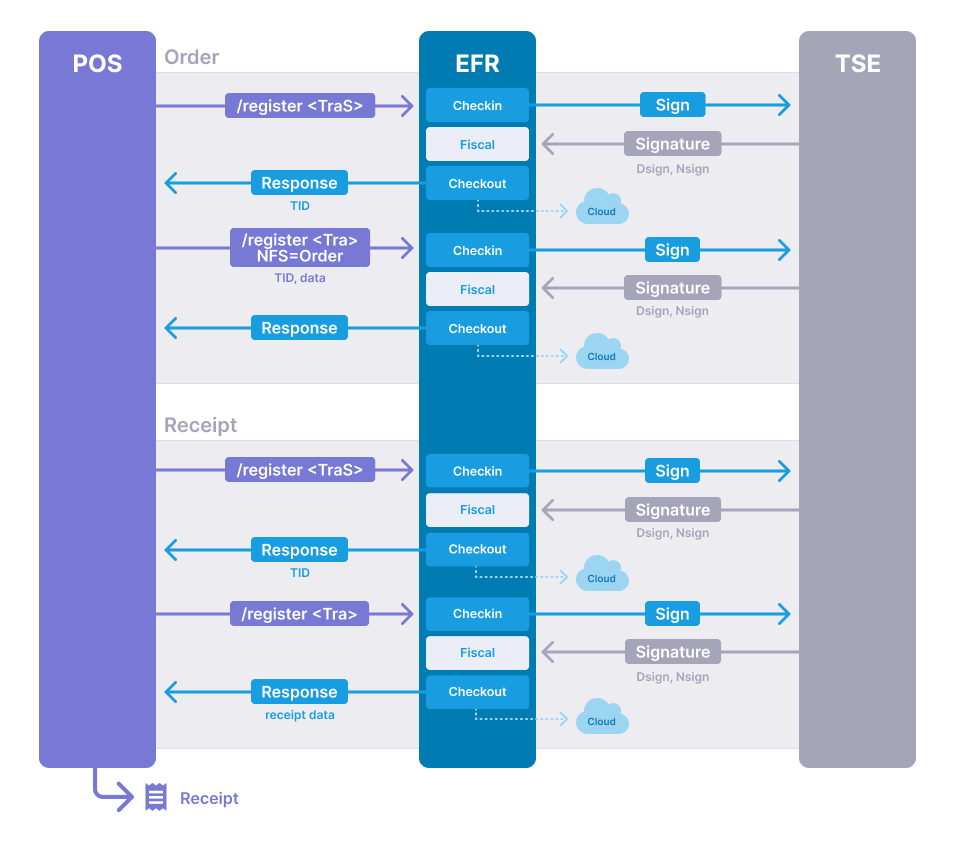
Compared to the fiscal regulation of other countries, the German fiscal law requires an incremental protocolling of the checkout process. The process starts by calling the /register function with a <TraS> Tag. After the payment, the process has to be closed by calling /register with a <Tra> Tag.
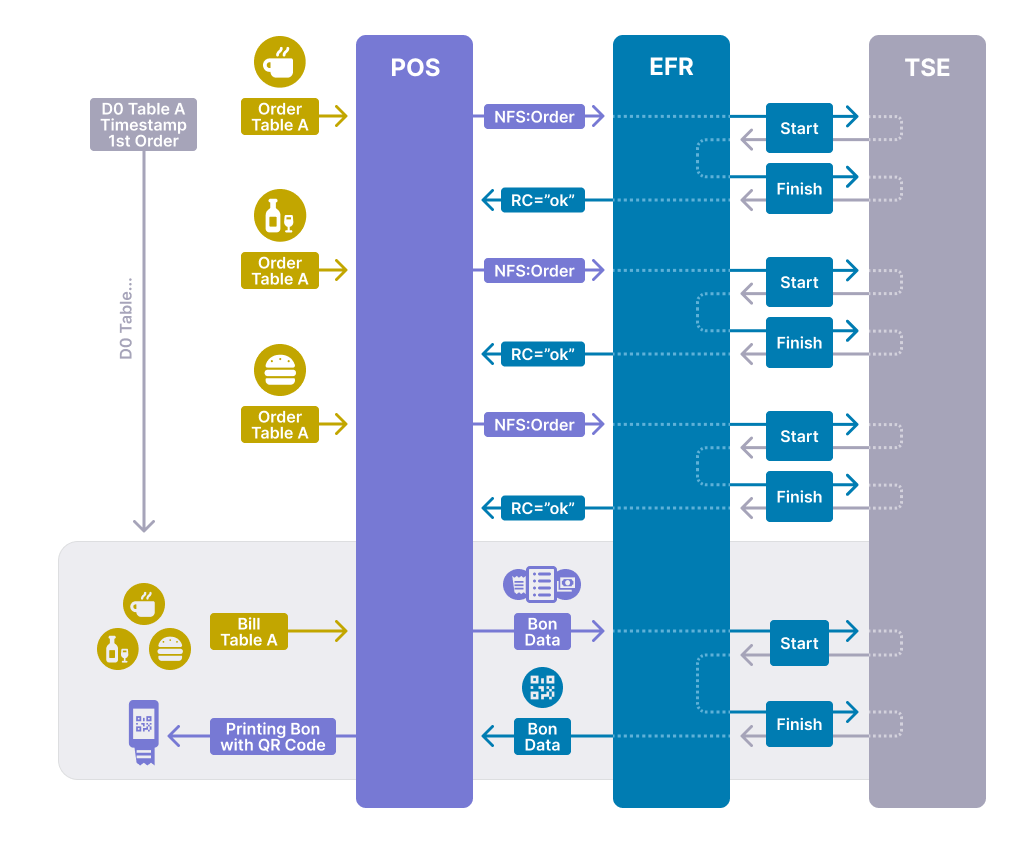
In between there might be update requests for long running orders. There, requests can be sent by calling /register with a <Tra> Tag and NFS="Order". Orders also have to be started with a request with a <TraS> Tag.
The incremental protocolling is just for POS, not for other systems like scales or pre-register systems.
Process Workflow
A sales process will be started by sending a request with a <TraS> Tag. At the completion of a transaction, the whole transaction data has to be sent to the EFR within a <Tra> Tag per /registers request. Long running orders can be recorded by sending a request with a <Tra> Tag and NFS="Order". Also, orders have to be started by sending a <TraS> request.
General Workflow
Gastronomy and Hospitality: long-running orders
Scales
Separate scales are pre-systems, so they do not have to send data to the TSE. POS with scanners register the data directly to the positions, so no update is needed.
ESR Format
Transaction data is sent to EFR as XML or JSON web request. See ESR format for ESR (efsta Simple Receipt) request and response format.
The following fields have specific meaning when generating the message to the fiscal system: 0
| Attribute | Name | Description | Datatype |
|---|---|---|---|
| ESR.TL | Transaction Location | Serial number of POS* | Text |
| ESR.TT | Transaction Terminal | Serial number of POS* | Text |
| ESR.TID | Transaction ID | The Transaction ID is returned from the start of a transaction and has to be transmitted in update and finish transaction requests | Number |
| ESR.NFS | Non-fiscal Signed | Can be used to sign training transactions or other non fiscal transactions | Text |
* For fiscal signature [TL + /] + TT is used.
QR Code
According to the BMF (DSFinV-K p. 109ff), a QR code is not required by fiscal law. However, if a receipt includes a QR code, a tax auditor will only use that code to verify individual receipts directly. If no QR code is printed on the receipt, a DSFinV-K export and a TSE export must be provided to allow the tax auditor to verify the data.
The data of the QR Code is returned in the <Code> tag.
<TraC SQ="362">
  <Result RC="OK" />
  <Fis ...>
    ...
    <Code>2;1/1;Kassenbeleg-V1;Beleg^528.90_0.00_0.00_0.00_0.00^537.40:Bar;16;102;2019-12-20T12:36:33.000Z;2019-12-20T12:36:33.000Z;ecdsa-plain-SHA384;unixTime;e2Pgb4XpCMH/rbVj/EQwedMu84Xs7V0wU7/r0ppiG/GjlOGYDpnUs0dZLuei/XNBTIL5Ve5fig/QcZW1bk2+26q3NAgOh0qVzu76tIkf6HvNOBl109JslBGZrESy6adA;BHdNMW1vSvYYdQqRKgzHq9AnG1ZavfpacMU1pfXkXheFaJnLLmE6gsFEHceHKs0iOR6oSqatFzwy6+cSKAzKFfHndVz+9zgGwgN9cn/RVEudbgdfishfyKkmP2HpBm0ruA==</Code>
  </Fis>
</TraC>
If the attribute "Fis_QR" is set in the EFR profile, the data of the base64 coded image will be in the response of the EFR, e.g.: Fis_QR=type=bmp&size=4
Retention periods
In Germany, invoices must be kept for ten years.
Digital storage:
Digitization makes it possible to store invoices in electronic form. It is important that the documents remain available and legible unchanged for the entire retention period.
Proper archiving:
In addition to pure storage, proper archiving of invoices is also crucial. This means that the documents should be stored systematically so that they are easy to find when needed.
GET /control/verify – Verify Signature
For support purposes only. With this method the qr code can be verified.
| Query | code | Enter whole Fis.Code |
| Request Example | http://localhost:5618/control/verify?code=... | |
| Response Header | Content-type | text/plain |
VAT Handling
Following rates are used by default, if only TaxG is delivered, but no tax rate in TaxA element:
| Tax group | TaxG | Tax rate |
|---|---|---|
| Normal | A | 19% |
| Reduced | B | 7% |
| Average tax rate (§24(1)Nr.3 UStG) | C | 10,7% |
| Average tax rate (§24(1)Nr.1 UStG) | D | 5,5% |
| Not taxable | E | 0% |
| VAT-exempt | F | 0% |
| Tax rate cannot be determined | G | 0% |
| Corona Normal | H | 16% |
| Corona Ermässigt | I | 5% |
Pay groups (PayG)
efsta PayG Mapping
| efsta PayG | DSFinV-K PayG |
|---|---|
| cash,change,refund,foreign,check | Bar (Cash) |
| rounding | Keine (None) |
| debitcard | ECKarte (Debit Card) |
| creditcard | Kreditkarte (Credit Card) |
| mobile,atm | ElZahlungsdienstleister (ElPayment service provider) |
| creditnote,loyalty | Guthabenkarte (Prepaid card) |
| voucher,title | is shown in the Bonpos table as type voucher |
| open | is shown in the Bonpos table as type open item |
alternativ PayG as digits
The payment group attribute can contain a value between 0 and 8, which has the following meaning:
| PayG | DSFinV-K PayG |
|---|---|
| 0 | Bar (Cash) |
| 1 | Unbar (Non-Cash: only if the cash register knows no further distinction) |
| 2 | Keine (None) |
| 3 | ECKarte (Debit Card) |
| 4 | Kreditkarte (Credit Card) |
| 5 | ElZahlungsdienstleister (ElPayment service provider) |
| 6 | Guthabenkarte (Prepaid card) |
| 7 | Voucher (is shown in the Bonpos table as type voucher) |
| 8 | Open item (is shown in the Bonpos table as type open item) |
Vouchers (PayG=7) and open items (PayG=8) are handled specifically because they must be represented as a position in the DSFinV-K. This means that these “payment methods” are not presented in the DsFinVK as payment methods, but as a position as follows:
- PayG=7 with positive amount is presented as a multi-purpose voucher redemption.
- PayG=7 with negative amount is presented as a multi-purpose voucher purchase.
- PayG=8 with positive amount is presented as the creation of a claim.
- PayG=8 with negative amount is presented as a claim resolution.
Specifics
Tax of old parts (Altteilsteuer)
A detailed description and an example can be found in the country specific business cases Altteilsteuer
Difference tax rate (Differenzbesteuerung)
A detailed description and an example can be found in the country specific business cases Differenzbesteuerung