Germany – Receipt Layout
Layout
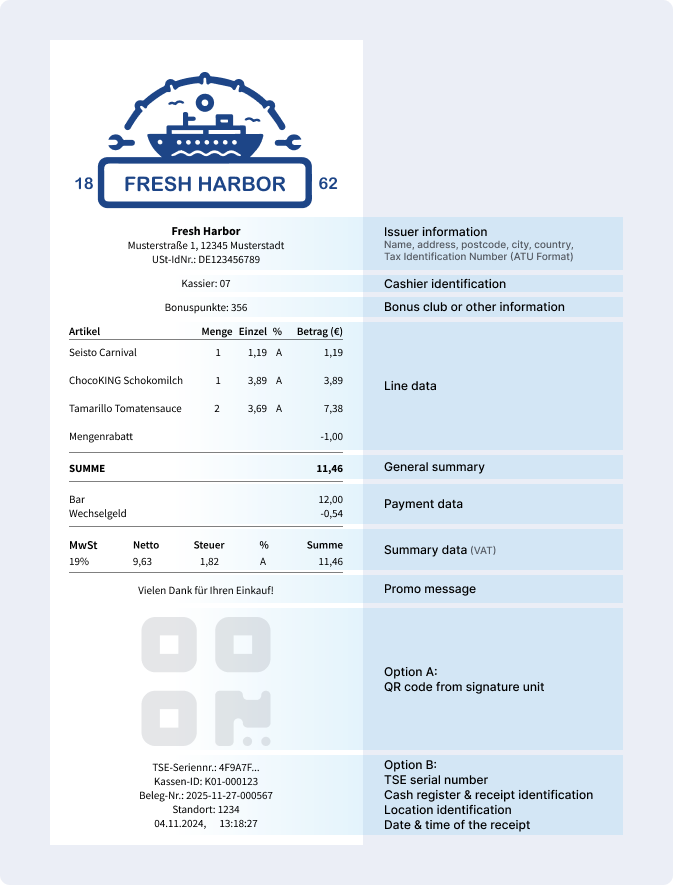
Receipt characteristics
For the printing of a receipt, the POS system receives the following fiscalization data from the TSE via the EFR:
- Serial number of the TSE
- Timestamp of the process start, triggered by the call of
/registerwith tag<TraS> - Timestamp of the process end, triggered by the call of
/registerwith tag<Tra> - Transaction ID (TID), generated by the secure element
- Sign counter, generated by the secure element
- Signature, generated by the secure element
Under German law, a receipt must contain the following data as required by the ministry of finance and the KassenSichV fiscalization regulations (§6). The TSE-specific fields are provided by the EFR as listed above.
- Full name and address of the issuing company
- Date and time the receipt was issued
- Tax number or sales tax identification number (USt-IdNr.)
- Type and quantity of the product sold or service purchased
- Total amount and tax rate of all products sold or services purchased
- Amount by payment type
- Consecutive transaction number (TID)
- In the case of a previous order (e.g. in the hospitality industry), the start time of the first order
- Signature counter of the TSE (sign counter)
- Check value of the receipt (signature)
These values must be printed on the receipt as a text and number combination. Optionally, they can also be displayed on the receipt in the form of a QR code. There is no obligation to use the QR code - however, such a code can help to significantly simplify a possible cash register inspection.
Either the values are printed directly on the receipt or a QR code is present - it is not required to have both. Still, if both are available, tax auditors will only verify the QR code.
Example Response
All Fis.Tag elements in the response must be printed on the receipt. The Fis.Code element should be printed as QR Code.
XML Response
<TraC SQ="1537030">
	<Result RC="OK"/>
	<ESR D="2024-08-01T10:50:30"/>
	<Fis TID="3">
		<Code>V0;001/1;Kassenbeleg-V1;Beleg^6.88_1.50_0.00_0.00_0.00^8.38:Bar;3;7;2024-08-01T08:50:30.000Z;...</Code>
		<Tag Label="TrNr:" Value="3" Name="FN"/>
		<Tag Label="Beg.:" Value="2024-08-01 10:50:30" Name="StartD"/>
		<Tag Label="Ende:" Value="2024-08-01 10:50:30" Name="FinishD"/>
		<Tag Label="TSE :" Value="0123456789abcdef0..." Name="Serial"/>
		<Tag Label="SigZ:" Value="7" Name="SignCnt"/>
		<Tag Label="Sign:" Value="aT775OTya1SXEGceVO2raDlRHv..." Name="Sign"/>
	</Fis>
</TraC>
Tags
The following tags will be returned from the EFR in case of a finishTransaction and have to be printed on the receipt:
| Label | Name | Description |
|---|---|---|
| TrNr | TID | Transactions number, which comes from the TSE. |
| Beg | StartD | Timestamp of the start of the process |
| Ende | FinishD | Timestamp of the end of the process |
| TSE | Serial | Serial number of the TSE |
| SigZ | SignCnt | Sign counter of the TSE |
| Sign | Sign | Signature of the TSE |
| KSNr | clientId | clientId according to "KassenSichV" By default, the EFR uses TL/TT, but it can be changed in the "Control" window; clientId can be set to a different value. The POS clientId must be stated on the receipt, TL and TT always have to be printed; therefore this tag is only delivered in the event of a deviation. |