EFR API
The API is a generic interface that can be used for all countries. If there are additional country-specific requirements, these are described in the country-specific guides. The generic interface is available from EFR version 2.5.0. The changes to the interface are backwards compatible.
This collection of EFR API requests are all the API requests needed to send transaction data, add/edit company data, or administer the EFR. REGISTER and CFG are mandatory to use the EFR. In fiscal printer countries, PERI is required to directly print and request printer related data required for these countries. All other API requests can be used as additional functionality for your system. The recommanded workflow can be found at Communication Workflow.
If you have any comments or questions to this document please contact us at: ticket@efsta.eu
The EFR Unified API Reference provides an OpenAPI 3.1 specification with endpoint descriptions, field definitions, country requirements, and JSON and XML examples. You can import it into tools such as Postman or Insomnia.
The download filename includes the specification's version date. For a fixed URL
to the current version, use
efr-openapi.yaml.
For business-case requirements, see Business Cases and Country Specific Business Cases.
If the EFR is used for multiple companies (see EFR Architecture) the ESR.TaxId must be sent in all /register requests.
If the EFR is used for muliple POS systems the query parameter "rn" must be sent for all request (except /register). The rn consists of TaxId$TL_TT
e.g.: GET localhost:5618/cfg?rn=DE123456789$1_1
Register
This route is used to register transactions (e.g. sales, invoices, payment transactions,...) to the EFR journal. The Format for all business cases can be found at Business Cases.
POST /register
Body
Content-Type: text/xml or application/json
The strucure of the ESR format can be found at ESR format and the values for the payment group are descript at Payment groups.
First Sample Transaction
- XML
- JSON
<Tra>
    <ESR D="2024-06-01T08:30:15" TL="001" TT="1" TN="1" T="8.38">
        <PosA>
            <Pos PN="1" IN="1001" Dsc="Example Item" TaxG="A" Amt="3.98" />
            <Pos PN="2" IN="1020" Dsc="Example Item" TaxG="B" Amt="1.50" />
            <Pos PN="3" IN="1030" Dsc="Example Item" TaxG="A" Amt="2.90" />
        </PosA>
        <PayA>
            <Pay Dsc="Example Payment" PayG="cash" Amt="10.00" />
            <Pay Dsc="Example Change" PayG="change" Amt="-1.62" />
        </PayA>
        <TaxA>
            <Tax TaxG="A" Prc="19" Net="5.78" TAmt="1.10" Amt="6.88"/>
            <Tax TaxG="B" Prc="7" Net="1.40" TAmt="0.10" Amt="1.50"/>
        </TaxA>
    </ESR>
</Tra>
{
    "Tra":{
        "ESR":{ "D":"2024-06-01T08:30:15", "TL":"001", "TT":"1", "TN":"1", "T":"8.38",
            "PosA":[
                {"_":"Pos","PN":"1", "IN":"1001", "Dsc":"Example Item", "TaxG":"A", "Amt":"3.98"},
                {"_":"Pos","PN":"2", "IN":"1020", "Dsc":"Example Item", "TaxG":"B", "Amt":"1.50"},
                {"_":"Pos","PN":"3", "IN":"1030", "Dsc":"Example Item", "TaxG":"A", "Amt":"2.90"}
            ],
            "PayA":[
                {"_":"Pay", "Dsc":"Example Payment", "PayG":"cash", "Amt":"10.00"},
                {"_":"Pay", "Dsc":"Example Change", "PayG":"change", "Amt":"-1.62"}
            ],
            "TaxA":[
                {"_":"Tax", "TaxG":"A", "Prc":"19", "Net":"5.78", "TAmt":"1.10", "Amt":"6.88"},
                {"_":"Tax", "TaxG":"B", "Prc":"7", "Net":"1.40", "TAmt":"0.10", "Amt":"1.50"}
            ]
        }
    }
}
Response Example
The structure of the EFR response can be found at Response TraC
- XML
- JSON
<TraC SQ="1537030">
	<Result RC="OK"/>
	<ESR D="2024-08-01T10:50:30" FN="001/1/1"/>
	<Fis TID="3">
		<Code>V0;001/1;Kassenbeleg-V1;Beleg^6.88_1.50_0.00_0.00_0.00^8.38:Bar;3;7;2024-08-01T08:50:30.000Z;...</Code>
		<Tag Label="TrNr:" Value="3" Name="TID"/>
		<Tag Label="Beg.:" Value="2024-08-01 10:50:30" Name="StartD"/>
		<Tag Label="Ende:" Value="2024-08-01 10:50:30" Name="FinishD"/>
		<Tag Label="TSE :" Value="0123456789abcdef0..." Name="Serial"/>
		<Tag Label="SigZ:" Value="7" Name="SignCnt"/>
		<Tag Label="Sign:" Value="aT775OTya1SXEGceVO2raDlRHv..." Name="Sign"/>
	</Fis>
</TraC>
{
  "TraC": {
    "SQ": "1537030",
    "Result": { "RC": "OK" },
    "ESR": { "D": "2024-08-01T10:50:30", "FN": "001/1/1" },
    "Fis": {
      "TID": "3",
      "Code": "V0;001/1;Kassenbeleg-V1;Beleg^6.88_1.50_0.00_0.00_0.00^8.38:Bar;3;7;2024-08-01T08:50:30.000Z;..."
      "Tag": [
        { "Label": "TrNr:", "Value": "3", "Name": "TID" },
        { "Label": "Beg.:", "Value": "2024-08-01 10:50:30", "Name": "StartD" },
        { "Label": "Ende:", "Value": "2024-08-01 10:50:30", "Name": "FinishD" },
        { "Label": "TSE :", "Value": "0123456789abcdef0...", "Name": "Serial" },
        { "Label": "SigZ:", "Value": "7", "Name": "SignCnt" },
        { "Label": "Sign:", "Value": "aT775OTya1SXEGceVO2raDlRHv...", "Name": "Sign" }
      ]
    }
  }
}
E-Invoicing
To send an invoice as e-Invoice as well, you have to trigger the electronic delivery with the (Document Delivery) DD field (e.g., DD="IT").
The DD value determines the System through which the E-Invoice is transmitted. In the example above, setting DD="IT" triggers the E-Invoicing process for Italy. If you want to use the test system just append -TEST, f.e: IT-TEST.
If required, also provide the (Document Delivery To) DDto field. That defines the Country-specific recipient identifier for the E-Invoice. More infos here
Example Request for Italy Testsystem
- JSON
- XML
{"Tra":
    {"ESR":
        {"DT": "INVOICE", "DD": "IT-TEST", "DDto": "WSRLPXY",
        "Ctm":
            {"TaxId": "IT02348690211", "Nam": "The Buyercompany S.p.A", "Adr": "Via Roma 1",
                "Zip": "12345", "City": "Milano (MI)"
            },
        "PosA": {
            "Pos": { "PN": "1", "Dsc": "test", "TaxG": "B", "Amt": "1.00"}},
        "PayA": {
            "Pay": { "Dsc": "Contanti", "PayG": "cash", "Amt": "1.00"}}
        }
    }
}
<Tra>
  <ESR DT="INVOICE" DD="IT-TEST" DDto="WSRLPXY">
    <Ctm TaxId="IT02348690211" Nam="The Buyercompany S.p.A" Adr="Via Roma 1" Zip="12345" City="Milano (MI)"/>
    <PosA>
      <Pos PN="1" Dsc="test" TaxG="B" Amt="1.00"/>
    </PosA>
    <PayA>
      <Pay Dsc="Contanti" PayG="cash" Amt="1.00"/>
    </PayA>
  </ESR>
</Tra>
If the EFR return the value of Fis.Code, it must be printed on the receipt as QR-code / barcode. If the EFR return Fis.Tag elements, all elements must be printed on the receipt (Label + Value).
Cfg - Base data/company header data
Before sending the first transaction the company header sales data should be configured. This can be done manually, via request or certralized via efsta portal.
For centralized administration configuration data can be set using the efsta portal, data is replicated to the EFR instances. If the central configuration is used, neither manual configuration nor programmatic configuration is necessary.
Manual configuration
Navigate to http://localhost:5618 in your browser and open “Basisdata” (base data). Enter the field values required, data is replicated to efsta cloud.
Programmatic configuration
This request should be issued once on startup of the frontend application to update receipt header fields like company name or location address. If values are unchanged, the request is without effect. It is mandatory to set this data before registering the first transaction. The strucure of the ESR format can be found at Cfg - Configuration
Get cfg data:
GET /cfg
Set cfg data:
POST /cfg
Query
| Name | Value | Example |
|---|---|---|
| RN | Optional Register Number, default: 'def'. GET /cfg without RN returns the settings of def: the global profile settings, and Cmp/Loc/Trm/Doc are empty until a configuration was set for it. If the profile has RN_TT enabled, def is not the default: GET /cfg without RN returns the only existing register, or fails with HTTP 400 #TT_AMBIGUOUS if there are several. POST /cfg without RN writes the sections into every existing register, def included, unless TL/TT in the body select a register. Always send RN in that case. | 1_1 |
Body
- JSON
- XML
{
    "Cfg": {
        "Cmp": {
            "Nam": "My Company",
            "label": "MyComp",
            "Adr": "Street",
            "AdrNr": "3",
            "Zip": "1000",
            "City": "City",
            "Ctry": "XY",
            "TaxId": "XY99999999999",
            "TIN": "123456789",
            "Org": "",
            "VATonPayment": 0,
            "FR_NAF": "47.11D",
            "FR_SRN": "732 829 32",
            "FR_RCS": "PARIS A",
            "FR_TYPE": "XXX",
            "FR_CAPITAL": "XXX",
            "FR_METIER": "XXX"
        },
        "Loc": {
            "TL": "001",
            "Nam": "My Location",
            "label": "MyLoc",
            "Adr": "123 Long Road",
            "Zip": "12345",
            "City": "Metropolis",
            "State": "XXX",
            "Ctry": "XY",
            "TaxId": "XY99999999999",
            "FR_SIR": "732 829 320 0007"
        },
        "Trm": {
            "TT": "1",
            "SW": "super-POS",
            "SWVersion": "3.4.5",
            "HW": "POS Brand",
            "HWModel": "POS model name",
            "Serial": "POS serial number"
        },
        "Dev": [
            {
                "Id": "1",
                "HW": "Dev Brand",
                "HWModel": "Dev Model",
                "SW": "My Dev Software",
                "SWVersion": "1.5.7",
                "Serial": "POS serial number"
            },
            {
                "Id": "2",
                "HW": "Dev Brand",
                "HWModel": "Dev Model",
                "SW": "My Dev Software",
                "SWVersion": "1.5.7",
                "Serial": "POS serial number 2"
            }
        ],
        "DE_Agentur": [
            {
                "Id": "1",
                "Nam": "Test Company",
                "Adr": "177 Long Road",
                "Zip": "12345",
                "City": "Metropolis",
                "Ctry": "XY",
                "TaxId": "XY99999999999"
            },
            {
                "Id": "2",
                "Nam": "Test Company 2",
                "Adr": "256 Long Road",
                "Zip": "12345",
                "City": "Metropolis",
                "Ctry": "XY",
                "TaxId": "XY99999999998"
            }
        ],
        "Doc": {
            "ContactName": "John Doe",
            "ContactTelephone": "123456789",
            "ContactElectronicMail": "j.doe@efsta.eu",
            "PaymentTerms": "30 days net",
            "PaymentPeriod": 30,
            "AccountName": "my company",
            "AccountIBAN": "AT00000000000000000000",
            "AccountBIC": "ASPAKAT2LXXX"
        }
    }
}
<Cfg>
    <Cmp Nam="My Company" label="MyComp" Adr="Street 3" Zip="1000" City="City" Ctry="XY" TaxId="XY99999999999" DE_STNR="" FR_NAF="47.11D" FR_SRN="732 829 32" FR_RCS="PARIS A" FR_TYPE="XXX" FR_CAPITAL="XXX" FR_METIER="XXX" />
    <Loc TL="001" Nam="My Location" label="MyLoc" Adr="123 Long Road" Zip="12345" City="Metropolis" State="XXX" Ctry="XY" Org="" ApplicationID="" TaxId="XY99999999999" FR_SIR="732 829 320 0007" />
    <Trm TT="1" SW="super-POS" SWVersion="3.4.5" HW="POS Brand" HWModel="POS model name" Serial="POS serial number" />
    <Dev>
        <Dev Id="1" HW="Dev Brand" HWModel="Dev Model" SW="My Dev Software" SWVersion="1.5.7" Serial="POS serial number" />
        <Dev Id="2" HW="Dev Brand" HWModel="Dev Model" SW="My Dev Software" SWVersion="1.5.7" Serial="POS serial number 2" />
    </Dev>
    <DE_Agentur>
        <Agentur Id="1" Nam="Test Company" Adr="177 Long Road" Zip="12345" City="Metropolis" Ctry="XY" TaxId="XY99999999999" />
        <Agentur Id="2" Nam="Test Company 2" Adr="256 Long Road" Zip="12345" City="Metropolis" Ctry="XY" TaxId="XY99999999998" />
    </DE_Agentur>
    <Doc ContactName="John Doe" ContactTelephone="123456789" ContactElectronicMail="j.doe@efsta.eu" PaymentTerms="30 days net" PaymentPeriod="30" AccountName="my company" AccountIBAN="AT00000000000000000000" AccountBIC="ASPAKAT2LXXX"/>
</Cfg>
Response
GET /cfg returns the global profile settings followed by the sections Doc, Trm, Loc, Cmp of the requested register number, without a Cfg wrapper. In JSON, "_": "Cfg" is the last key; in XML the root element is <Cfg>. For an unknown RN the sections are null (JSON) or empty elements (XML). Some countries add further keys (e.g. DE, AT).
POST /cfg requires the Cfg wrapper in the request body; a body without it is rejected with HTTP 400. The response is {"_": "Cfg", "Result": {...}} (XML root <Cfg>) without SQ.
On HTTP 200, Result.RC is always OK, even if a section was rejected. Always check Result.Warning:
| Prefix | Meaning | Example |
|---|---|---|
i- | Information, e.g. which section was updated. For a register other than def the RN is included. | i-updated: Cmp, i-updated: [1_1] Cmp |
w- | Warning; the request was processed, but check it. w-#RN_TT … (only with RN_TT enabled) means the sections were written to def; if RN was missing, they were also written to every other existing register. | w-#EMPTY, w-#RN_TT client specification ?RN=... missing |
e- | Error; this section was not saved. | e-#INVALID Province "X" is not valid for ES |
If Warning is missing, nothing was changed.
Response examples
- JSON
- XML
GET /cfg
{
  "Offline": false,
  "Country": "XY",
  "TaxId": "XY99999999999",
  "FinancialYear": 1,
  "Attributes": "",
  "RN": "def",
  "Doc": {},
  "Trm": { "TT": "1" },
  "Loc": { "TL": "001", "Nam": "My Location" },
  "Cmp": { "Nam": "My Company", "TaxId": "XY99999999999", "Ctry": "XY" },
  "_": "Cfg"
}
POST /cfg
{
  "_": "Cfg",
  "Result": { "RC": "OK", "Warning": ["i-updated: Cmp"] }
}
GET /cfg
<Cfg Offline="false" Country="XY" TaxId="XY99999999999" FinancialYear="1" Attributes="">
    <Doc/>
    <Trm TT="1"/>
    <Loc TL="001" Nam="My Location"/>
    <Cmp Nam="My Company" TaxId="XY99999999999" Ctry="XY"/>
</Cfg>
POST /cfg
<Cfg>
    <Result RC="OK"/>
</Cfg>
Cfg field values also are used for bill.efsta.net Digital Receipt display, the "label" fields should contain abbreviations (10 char max.) to be used as denomination in lists.
EFR State
Get state information about running EFR installation.
GET /state
Request Header
| Name | Value |
|---|---|
| Accept | application/json or text/xml |
Response
- JSON
- XML
{
    "pid": 32756,
    "arch": "x64",
    "uptime": 12563,
    "name": "EFR",
    "version": "2.5.0",
    "manifest": "...",
    "Country": "XY",
    "Online": true,
    "Recorder": "online",
    "RN": "def",
    "RecSent": 0,
    "RecQueued": 0,
    "RetryQueued": 0,
    "TimeOffset": 0,
    "D": "2024-06-28T09:54:26+02:00",
    "DiskUsage": 0.038301,
    "DiskQuota": 1000,
    "Company": "XY123456789"
}
<State>
    <pid>32756</pid>
    <arch>x64</arch>
    <uptime>12563</uptime>
    <name>EFR</name>
    <version>2.5.0</version>
    <Country>XY</Country>
    <Online>true</Online>
    <Recorder>online</Recorder>
    <Badge>XY123456789</Badge>
    <EFR>0000000XXXX</EFR>
    <RN>def</RN>
    <RecSent>0</RecSent>
    <RecQueued>0</RecQueued>
    <RetryQueued>0</RetryQueued>
    <TimeOffset>0</TimeOffset>
    <D>2024-06-28T09:54:26+02:00</D>
    <DiskUsage>0.038301</DiskUsage>
    <DiskQuota>1000</DiskQuota>
    <Company>XY123456789</Company>
</State>
| Name | Value | Example |
|---|---|---|
| pid | Process Id | 32756 |
Export
From EFR V2.5GET /export
Query & Type
Query
| Name | Value | Example |
|---|---|---|
| RN | Optional Register Number, default: 'def' | 1_1 |
| type | Export type | dsfinvk |
| from | From date YYYY-MM-DD | 2024-01-15 |
| till | Till date YYYY-MM-DD | 2024-12-31 |
| target | Optional. Target folder-path to save export file to. | C:/exports |
| open | Optional. Include data of the currently not closed day. Only available for type dsfinvk | on |
Type
| Type | Description | Response | Countries |
|---|---|---|---|
jou | EFR journal export | File jou*.zip | * |
dep | Datenerfassungsprotokoll | File dep-export.zip | AT |
tse | TSE export | File export.tar | DE |
gobd | GoBD export | File gobd.zip | DE |
dsfinvk | DSFinV-K export | File export.zip | DE |
saft | SAF-T export | File export.zip | DK, NO, PT, SE |
nf525-export | NF525 export to verify signature chain | File export.xml | FR |
nf525-total | NF525 export to verify grand totals | File total.xml | FR |
nf525-jet | NF525 Journal des Évènements Techniques | File audit.csv | FR |
nf525-jou | EFR journal export including proof-script | File jou.zip | FR |
Profile
Query & Body
Query
| Name | Value | Example |
|---|---|---|
| RN | Optional Register Number, default: 'def' | 1_1 |
Body
- JSON
- XML
{
    "Badge": "XXXXXXXXXX" ,
    "TaxId": "XX123456789",
    "RN_TT": false
}
<profile>
    <Badge>XXXXXXXXXX</Badge>
    <TaxId>XX123456789</TaxId>
    <RN_TT>false</RN_TT>
</profile>
ENV-based EFR Profile Configuration (Advanced)
The EFR Profile settings can be configured through environment (ENV) variables. These settings are applied during system startup and, once active, block changes to the same configuration via the UI or API in order to avoid conflicts.
Structure
-
Environment variables must follow this format where
__DOT__is used as a separator between the different properties of the setting object:EFSTA_EFR_PROFILE_CFG__DOT__{RN}__DOT__{setting_name}={value}- If the structure is not respected, the setting will not be applied
-
The RN must be defined so the system knows which register to apply the setting to
- On single-RN systems, def can be used instead of a specific RN
- Since some RNs may contain the
$symbol, which is not supported in ENV variable names, use__DOLLAR__instead. The EFR automatically converts it back to$
-
Boolean values must be lowercase (true, false)
Example (using PL specific settings)
EFSTA_EFR_PROFILE_CFG__DOT__def__DOT__RN_TT=true
EFSTA_EFR_PROFILE_CFG__DOT__001_1__DOT__Sign_require="FP_T88FVA"
EFSTA_EFR_PROFILE_CFG__DOT__001_1__DOT__Sign_Cfg="COM7:115200"
EFSTA_EFR_PROFILE_CFG__DOT__001_2__DOT__Sign_require="FP_T88FVA"
EFSTA_EFR_PROFILE_CFG__DOT__001_2__DOT__Sign_Cfg="COM5:115200"
EFSTA_EFR_PROFILE_CFG__DOT____DOLLAR__001_456__DOT__Sign_Cfg="COM5:115200"
Blocking of Settings
If a configuration is applied through ENV variables, it cannot be modified via the UI or API.
The API will return the following message if a blocked setting is changed: Setting of {setting_name} for {RN} is blocked
To re-enable UI/API configuration
- Remove the corresponding ENV variable(s)
- Restart the EFR
When a Setting is Invalid
The ENV settings of one register (RN) are applied together, at every EFR start. If one value is invalid, none of that register's ENV settings are applied, the valid ones included. The EFR log shows a summary line, then one line per invalid setting with the reason:
app        def env update failed, NONE of the env settings applied, fix and restart EFR, invalid: Badge
app        def env Badge rejected: EFR already activated
Log lines are cut after 119 characters by default, so with several invalid settings or a long RN the list in the summary line can be incomplete. Every invalid setting has its own line:
app        def env update failed, NONE of the env settings applied, fix and restart EFR, invalid: FinancialYear, DiskQu
app        def env FinancialYear rejected: Format: [1-12]
app        def env DiskQuota rejected: minimum 200 MB
To see the full lines, raise the line length with the Log_length attribute in the Profile of the def register, for example Log_length=250.
To fix it
- Correct or remove the invalid ENV variable(s)
- Restart the EFR
Until then, the ENV settings of that register stay blocked in the UI and API (see Blocking of Settings), so they can only be fixed through the ENV variables. When the ENV settings are applied, the log shows def updated trough env.
If the update itself fails with an error, the log shows:
app        def env update failed with an error, check whether the env settings were applied
app        def env update error: <error>
In this case the EFR cannot tell whether the settings were saved. Check the Profile of that register in the EFR UI.
Querying ENV Settings
The EFR provides a way to query which settings are set through ENV variables. Use the following endpoint to view them:
GET
/state
This does not list all Profile settings, only those from ENV. It shows the values as they are set, not whether they were applied: an invalid setting blocks all ENV settings of its register (see When a Setting is Invalid), so check the EFR log.
Example response (EnvSettings section highlighted)
{
  "uptime": 162815,
  "name": "EFR",
  "version": "2.6.1.1",
  "Country": "ZZ AT BE CZ DE DK ES FR HR HU IT LT NO PL PT SE SI SK",
  "Online": false,
  "Recorder": "inactive",
  "RN": "def $001_456 001_1 001_2",
  ...
  "EnvSettings": {
    "def": {
      "RN_TT": true
    },
    "001_1": {
      "Sign_require": "FP_T88FVA",
      "Foo": "Bar",
      "Sign_Cfg": "COM7:115200"
    },
    "001_2": {
      "Sign_require": "FP_T88FVA",
      "Sign_Cfg": "COM5:115200"
    },
    "$001_456": {
      "Sign_Cfg": "COM5:115200"
    }
  }
}
System Restart Triggers
If the following settings are applied via ENV variables, the EFR will automatically restart:
- HttpServer_Port
- UdpServer_Port
- DiskQuota
- Proxy
Badge
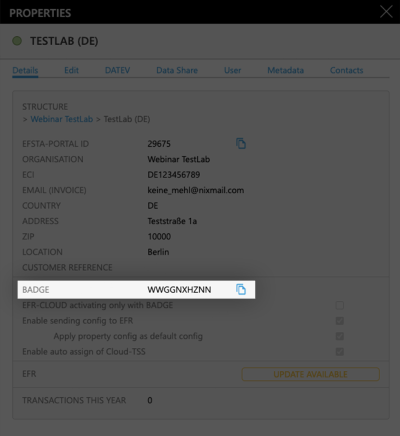
This request can be used to set the Badge field in the EFR profile to connect the instance to the efsta Cloud.
Locating the badge in the Portal
The Badge can be found in the portal by following these steps:
- Navigate to “Companies” on the left side menu

- Open the properties of your company

- Locate and copy the badge number
EFR Modes
The EFR service can be operated in different modes and depending on this, a different badge must be entered. For more details, see Architecture EFR Modes.
Single POS
For "Single POS" mode, the company badge should be used.
You can also specify the Transaction Location (TL) and Transaction Terminal (TT) within the badge. This means the POS identification is already known during activation, and a configuration can be automatically downloaded from the cloud. Additionally, a fiscal unit can be automatically assigned.
e.g: AAAAAAAAAA.001/1
You can also specify an organization's badge and additionally the company's TaxID with TL/TT. This way, you know the badge before the rollout. e.g: AAAAAAAAAA.DE123456789$001/1
Multi POS
For "Multi POS" mode, the company badge should be used. The RN_TT option must also be set to true for "Multi POS" to be used on the EFR service and TL/TT must be included with every request.
Multi Company
For "Multi Company" mode, the badge of an organisation must be used. The RN_TT option must also be set to true for "Multi Company" mode to be used on the EFR service and TaxId with TL/TT must be included with every request.
For setting up new registers (RNs) up front, before any configuration or transaction, see the Register Creation business case.
Tax IDs for testing
In the following table are Tax IDs for testing for each country
| Flag | Country | Test Tax Id |
|---|---|---|
 | Austria | ATU57780814 |
 | Belgium | BE0123456749 |
 | Czechia | CZ123456789 |
 | Germany | DE123456789 |
 | Denmark | DK99999993 |
 | Spain | ES123456789 |
 | France | FRXX999999998 |
 | Croatia | HR123456789 |
 | Hungary | HU123456789 |
 | Italy | IT123456789 |
 | Lithuania | LT123456789 |
 | Norway | NO999999999 |
 | Poland | PL9999999999 |
 | Portugal | PT999999990 |
 | Sweden | SE999999999901 |
 | Slovenia | SI123456789 |
 | Slovakia | SK123456789 |
Journal
Find
This request can be used to find and retrieve transaction data of the EFR journal.
GET /find
Query & Request Header
Query Parameter
| Name | Value | Example |
|---|---|---|
| rn | Optional Register Number, default: def. Alternatively, TaxId (optional), TL and TT can be specified as parameter | 1_1 |
| from | From date (optional) | 2024-11-06 |
| till | Till date (optional) | 2024-11-06 |
| limit | Optional limitation of volume and runtime in the format XrowsYms with: X = receipt count Y = max runtime in ms default: 1000rows5000ms | 10rows10000ms |
| sort | Sort order, default: desc | asc |
| continuation | Continuation string (optional) | 51856974 |
Additional query parameters can be added for transaction search criteria.
| Name | Value | Example |
|---|---|---|
| fn | Fiscal number (can be used instead of tl/tt/tn) | 001/1/10 |
| tn | Transaction number | 5 |
| d | Date | 2024-11-05 |
| sq | Sequence number | 10 |
| _ | Record Type. Tra...Transaction, TraS...Start Transaction, Rep... Reports, Cfg... Configuration, log... Logs, etc. | Tra |
| t | Total | 8.38 |
| nfs | Non fiscal transactions (see Business Cases) | Z |
You can search for all properties that are in the ESR object (see journal files).
Request Header
| Name | Value |
|---|---|
| Accept | application/json or text/xml |
Get Last Transaction
Fetches the last data object registered (POST /register). To be used on system restart or for informational purposes.
GET /last
Query, Request Header & Response
Query
| Name | Value | Example |
|---|---|---|
| RN | Optional Register Number, default: 'def' | 1_1 |
| _ | optional rec type filter | Tra, TraS, Cfg |
Request Header
| Name | Value |
|---|---|
| Accept | application/json or text/xml |
Response
XML or JSON transaction data, utf-8
Render
Use to show last transaction on a (customer) display, or to fetch a formatted PDF file for saving/printing. Formatting in both cases is using fiscal.pug, which can be customized for the intended purpose.
| Request | Response |
|---|---|
GET /render | HTML rendering of the receipt |
GET /render/pdf | PDF rendering of the receipt |
GET /render/text | Plain text rendering of the receipt |
GET /render/escpos | ESC/POS commands line by line for use with a receipt printer |
Query
| Name | Value | Example |
|---|---|---|
| RN | Optional Register Number, default: 'def' | 1_1 |
| FN | Optional fiscal number, default: last receipt | 4711 |
Peri
Available when a fiscal printer is connected to the EFR.
Direct Printing
Prints text directly on the connected printer without registering any transaction to the EFR journal.
POST /peri/print
Query & Body
Query
| Name | Value | Example |
|---|---|---|
| RN | Optional Register Number, default: 'def' | 1_1 |
Body
Content-Type: text/plain
sdfjk
dsjfkls
dsjfkl
Printer State
Get information about the printer and/or fiscal module.
GET /peri/print/state
Query, Request Header & Response
Query
| Name | Value | Example |
|---|---|---|
| RN | Optional Register Number, default: 'def' | 1_1 |
Request Header
| Name | Value |
|---|---|
| Accept | application/json or text/xml |
Response
- JSON
- XML
{
    "ModuleName": "[printer module name]",
    "ID": "[printer serial]",
    "ZI": 1,
    "SimpleState": {
        "DayOpen": true,
        "ZRequired": false,
        "NextZRequired": "2024-10-05T00:00:00",
        "DrawerOpen": false,
        "PaperNearEnd": false,
        "PaperEnd": false,
        "CoverOpen": false,
        "MemAlmostFull": false,
        "MemFull": false,
        "CertExpires": "2028-10-05T00:00:00"
    }
}
<PrintState>
    <ModuleName>[printer module name]</ModuleName>
    <ID>[printer serial]</ID>
    <ZI>1</ZI>
    <SimpleState>
        <DayOpen>true</DayOpen>
        <ZRequired>false</ZRequired>
        <NextZRequired>2024-10-05T00:00:00</NextZRequired>
        <DrawerOpen>false</DrawerOpen>
        <PaperNearEnd>false</PaperNearEnd>
        <PaperEnd>false</PaperEnd>
        <CoverOpen>false</CoverOpen>
        <MemAlmostFull>false</MemAlmostFull>
        <MemFull>false</MemFull>
        <CertExpires>2028-10-05T00:00:00</CertExpires>
    </SimpleState>
</PrintState>
| Name | Value | Example |
|---|---|---|
| ModuleName | Printer module name | "Epson_FP" |
| ID | Printer serial number | "99MEY022311" |
| ZI | Current Z-Index | 1 |
| SimpleState.DayOpen | Nullable boolean, null if printer does not provide it | |
| SimpleState.ZRequired | Nullable boolean, null if printer does not provide it | |
| SimpleState.NextZRequired | Nullable string, null if printer does not provide it | 2024-10-05T00:00:00 |
| SimpleState.DrawerOpen | Nullable boolean, null if printer does not provide it | |
| SimpleState.PaperNearEnd | Nullable boolean, null if printer does not provide it | |
| SimpleState.PaperEnd | Nullable boolean, null if printer does not provide it | |
| SimpleState.CoverOpen | Nullable boolean, null if printer does not provide it | |
| SimpleState.MemAlmostFull | Nullable boolean, null if printer does not provide it | |
| SimpleState.MemFull | Nullable boolean, null if printer does not provide it | |
| SimpleState.CertExpires | Nullable string, null if printer does not provide it | "2028-10-05T00:00:00" |
Line Display
Displays text directly on the connected line display of the printer. During position and payment entry the cash register application should send referring description and price/amount information immediately to the customer display.
POST /peri/display
Query & Body
Query
| Name | Value | Example |
|---|---|---|
| RN | Optional Register Number, default: 'def' | 1_1 |
Body
Content-Type: text/plain
Arrotondato 30,00 €
Totale      30,01 €
Open Drawer
Opens the cash drawer. By default the cash drawer should be managed by the cash register application.
POST /peri/drawer
Query
| Name | Value | Example |
|---|---|---|
| RN | Optional Register Number, default: 'def' | 1_1 |
Open Drawer and Wait
Opens the cash drawer and sends the response when the cash drawer is closed. As the drawer might be left open for a longer time, a HTTP status 102 Processing may be sent after 30 seconds.
POST /peri/drawer/wait
Query
| Name | Value | Example |
|---|---|---|
| RN | Optional Register Number, default: 'def' | 1_1 |