DATEV MeinFiskal - End customer instructions
DATEV integration options: MeinFiskal vs. DATEV Invoice Data Service 1.0
This page helps you (end customer / taxable company) understand which DATEV service fits your use case and who typically decides. It also outlines the onboarding steps you will see when DATEV services are used together with your POS/solution provider and the efsta ecosystem.
What is DATEV MeinFiskal?
MeinFiskal is DATEV’s portal and service environment around POS/cash register compliance. It is the entry point for services such as:
- DATEV Kassenarchiv online (audit-proof archiving of cash register data for 10 years)
- DATEV Kassenbuch online integration (using archived day-closing data to pre-fill the cashbook)
- DATEV Kassenmeldung (cash register reporting workflow; role-based collaboration is planned/partially available depending on DATEV rollout)
- (In the MeinFiskal context) interactions with DATEV authentication (e.g., SmartLogin) for certain regulated processes
Typical data domain:
cash register day closings, transaction/export formats (e.g., DSFinV‑K), TSE data (TAR files), and audit exports.Typical outcome:
You are able to archive, export for audits, and (optionally) feed bookkeeping/cashbook processes via DATEV.
More information about DATEV MeinFiskal can be found here: DATEV MeinFiskal
What is DATEV Invoice Data Service 1.0?
DATEV Invoice Data Service 1.0 is designed for invoice data exchange into the DATEV accounting world.
It is typically used to provide structured invoice data for downstream processes in DATEV (e.g., accounting workflows), depending on what your software vendor / solution provider implements and what your tax advisor expects.
Typical data domain:
invoice data (not cash register archiving)Typical outcome:
streamlined invoice-related accounting processes with DATEV
Practical rule of thumb: If your main challenge is “cash register data, TSE, audits, DSFinV‑K, and cashbook”, you are in MeinFiskal territory. If your main challenge is “invoice data flow into DATEV”, you are in Invoice Data Service territory.
More information about DATEV Invoice Data Service 1.0 can be found here: Rechnungsdatenservice 1.0
Key differences (decision matrix)
| Topic | DATEV MeinFiskal | DATEV Invoice Data Service 1.0 |
|---|---|---|
| Primary purpose | POS/cash-register compliance services (archiving, cashbook link, cash register reporting workflows) | Invoice data provisioning for DATEV invoice/accounting processes |
| Typical trigger | You operate electronic cash registers and must retain/export POS data and TSE data; you want an audit-proof archive and/or cashbook process | You want invoice data to flow into DATEV processes (e.g., for accounting efficiency) |
| Data focus | Kassenabschluss, Einzelaufzeichnungen, DSFinV‑K exports, TSE TAR files, audit exports | Invoice data (structured invoice information) |
| End customer interaction | Usually: register/login at DATEV MeinFiskal , order “Kassenordner”, connect POS, export data, optionally link to Kassenbuch online | Often less “portal-driven” for end customers; depends on vendor workflow and DATEV setup |
| Most common stakeholders | Merchant/taxpayer, POS vendor, cash register dealer, tax advisor/accountant, DATEV | Merchant, software/vendor, tax advisor/accountant, DATEV |
| Typical “success” criteria | Archived data available; exports work; optional daily transfer into Kassenbuch online works | Invoice data arrives correctly in DATEV processes and supports accounting goals |
How to decide which service is best for you
Choose DATEV MeinFiskal if you need
- Revisionssichere Archivierung of POS/cash-register data (including TSE data)
- Audit readiness (export of DSFinV‑K and original data for tax audits)
- A workflow that supports Kassenbuch online (daily, automated generation of posting-relevant records from day closings)
- A portal-based handling of cash register compliance topics via DATEV MeinFiskal
Choose DATEV Invoice Data Service 1.0 if you need
- A DATEV integration focused on invoice data (not on cash register archiving)
- To improve invoice-related accounting workflows with DATEV (typically coordinated with your tax advisor)
If you are unsure
Use this quick checklist:
- “Is my core need related to cash register exports / DSFinV‑K / TSE / audits?” → MeinFiskal
- “Is my core need related to invoice data flow into DATEV?” → Invoice Data Service 1.0
- “Do I need both POS compliance AND invoice workflow integration?” → You may use both (depending on your vendor setup).
Who can make the decision?
In practice, the decision is shared—because it impacts compliance, operations, and accounting.
The end customer (taxable company / merchant) is typically the contractual user and is responsible for compliance obligations.
However, the decision is usually made together with:
- Your tax advisor / accounting office (because it affects DATEV accounting processes and access rights)
- Your POS vendor / solution provider (because they must support the required DATEV interface and configuration)
- Sometimes your cash register dealer (especially for POS-side setup of automatic archiving)
Decide jointly in a short alignment call:
- Merchant (owner/finance lead)
- Tax advisor
- POS vendor / implementation partner
Onboarding steps
Before setting up the connection in the MeinFiskal portal, an active DATEV account must already be in place (including the required access credentials). This account is necessary to register and configure the integration correctly.
Once the connection is established in the portal, the data is transmitted automatically from our middleware directly into the DATEV environment (Kassenarchiv and, if applicable, Kassenbuch), ensuring secure and seamless data flow.
DATEV MeinFiskal onboarding
Step 1: Registration
- Create an account with email and password at DATEV MeinFiskal
- Confirm registration via code (sent by email)
Step 2: Ordering
- Order the required number of “Kassenordner”
- Usually one per physical cash register
- The service is billed per active Kassenordner (DATEV pricing/terms apply)
Step 3: (Optional) "Kassenbuch online" connection
- Prerequisites include:
- Kassenarchiv online is active and receiving data
- A DATEV Unternehmen online / Kassenbuch online “Bestand” exists
- The Kassenordner is then linked to the Kassenbuch online “Kasse”
- Authentication may require DATEV SmartLogin / SmartCard (depending on your setup)
efsta Portal onboarding
Step 1: Feature Activation
- To request the activation of DATEV MeinFiskal, please contact your partner manager.
- To participate to the Pilot phase, a pilot agreement is required.
Step 2: Login & Authorization
- Open the efsta Portal and go to your Company Settings
- Navigate to the "MeinFiskal" tab
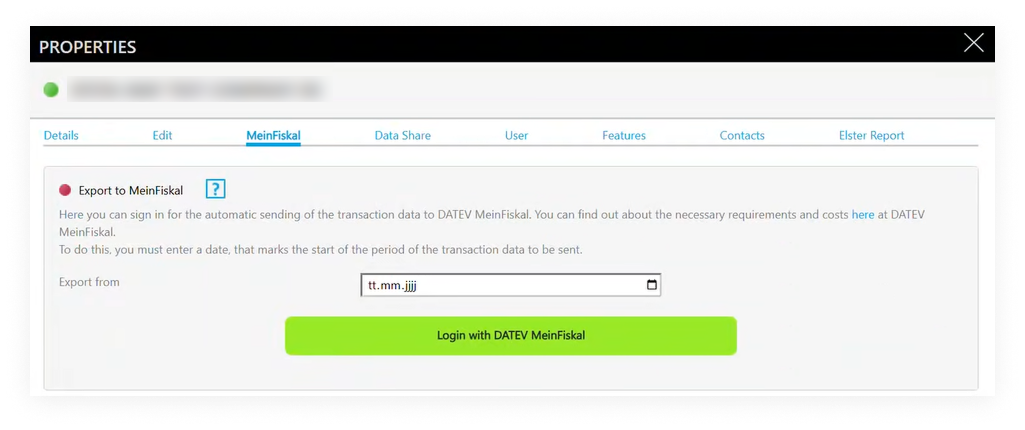
- Select the export start date
- currently from the start of the current year
- Click "Login with DATEV MeinFiskal" and log in using your MeinFiskal credentials
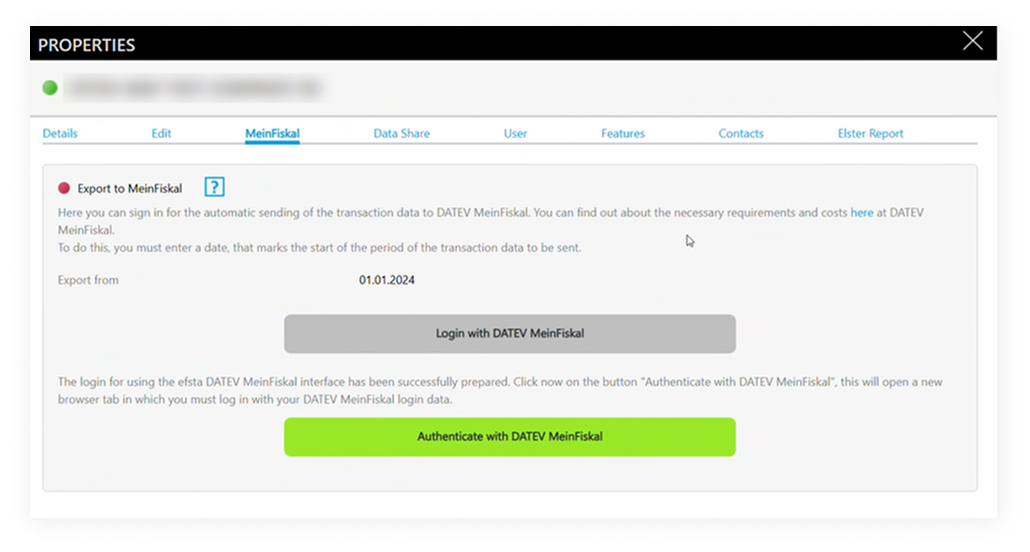
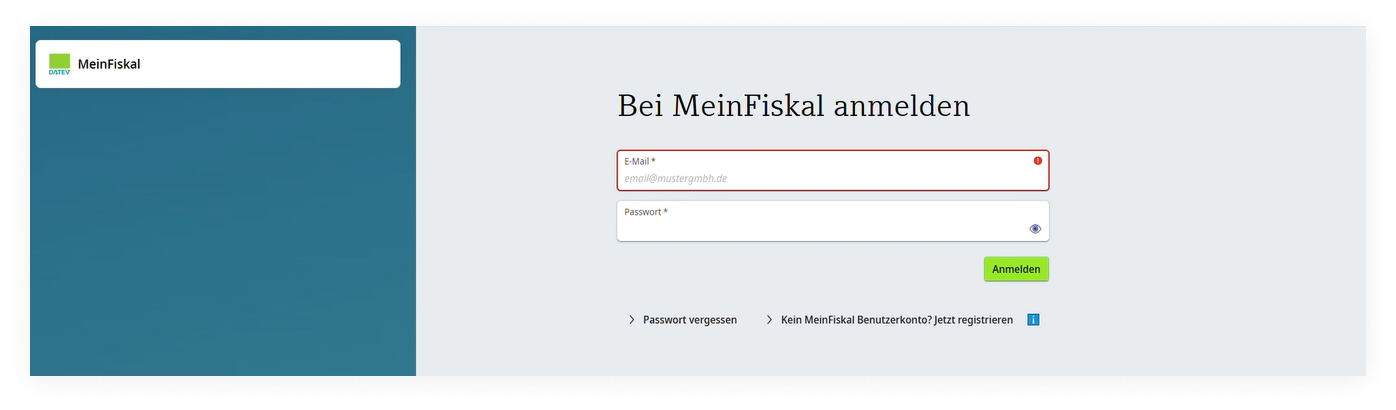
- Authorize efsta to transfer data
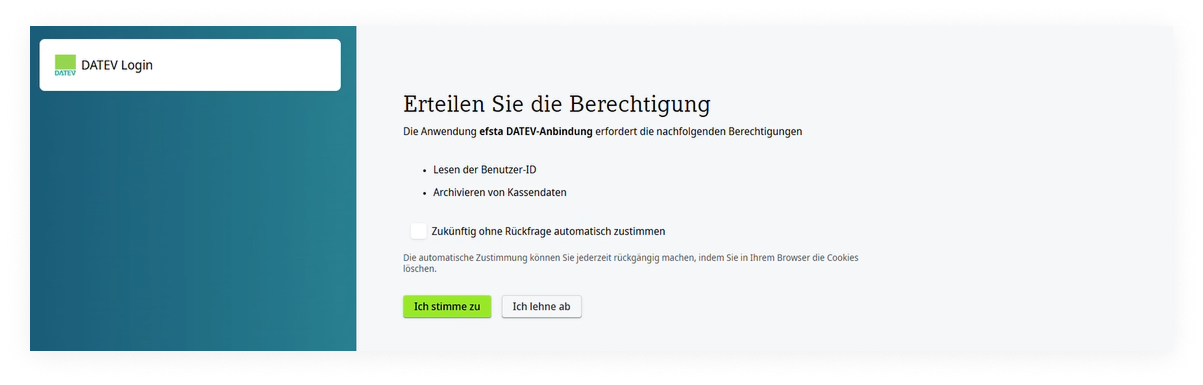
- Once connected, automatic exports start the following day
- the status is shown in the efsta Portal
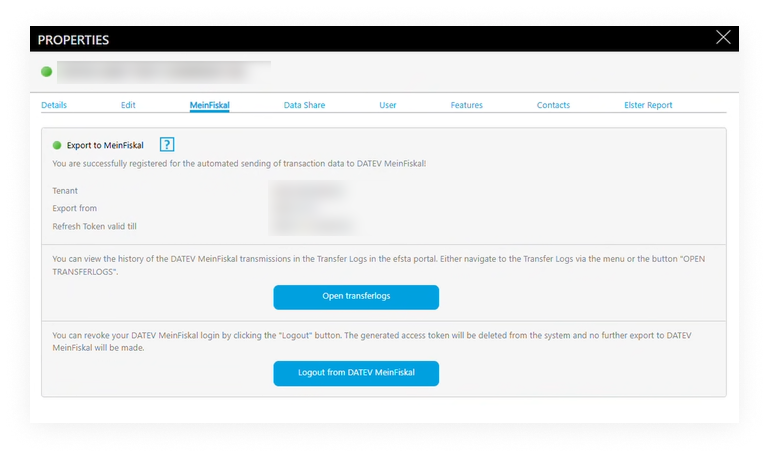
- the status is shown in the efsta Portal
Disconnecting the Integration
If you log out from MeinFiskal in the portal:
- Data transfers stop immediately
- Already transferred data remains in DATEV
To fully deactivate the service (including billing aspects), please contact your efsta partner or support.
Helpful links (DATEV)
- MeinFiskal portal
- DATEV marketplace (to check supported solutions/vendors)
If your overall German compliance topic includes cash register reporting (§146a AO) via efsta, keep in mind that:
- Reporting obligations remain with the taxable company (merchant), unless you explicitly authorize a third party.
- Your POS/vendor/implementation partner will guide you whether your setup uses manual XML download/upload or automated processes (depending on your contracted services).