Italy – FAQs
Italy
Frequently Asked Questions
General
How can I be prepared for tax audits in Italy?
To be prepared for tax audits in Italy, it is essential to ensure correct fiscal processing and maintain complete, accessible fiscal records. This can be achieved by using the efsta fiscal middleware together with the required fiscal systems.
How efsta supports audit readiness
By integrating the efsta fiscal middleware into your point-of-sale system, you can ensure that:
- Fiscal processes are handled correctly and consistently.
- Required fiscal data is stored and maintained in a structured manner.
- Transactions are processed in accordance with Italian fiscal requirements.
This significantly improves your readiness for tax audits and simplifies compliance management.
Access to fiscal data
In the event of a tax audit, businesses must be able to provide relevant fiscal data to the authorities without undue delay.
The efsta Portal enables you to:
- Generate fiscal exports quickly, including human-readable formats such as CSV.
- Access fiscal data for specific periods.
- Retrieve structured information required by tax authorities.
This simplifies the audit process and helps reduce the time and effort required during inspections.
Legal requirements in Italy
During a tax audit, businesses may be required to:
- Provide fiscal data stored on the RT (Registratore Telematico).
- Provide fiscal data stored on external systems, such as the efsta fiscal middleware and related infrastructure.
- Demonstrate the accuracy and consistency of the fiscal information submitted to the tax authorities.
The efsta Fiscal Middleware helps ensure data consistency between the POS system and the RT, providing a reliable basis for fiscal reconciliation and audit verification.
How can I create a daily closing?
A daily closing (Z-report) is mandatory.
If no Z-report is sent within 48 hours, the printer will block further sales operations. If no Z-report is sent within 48 hours:
- the printer will block sales
- operations cannot continue until the report is completed
The Z-report can be triggered either:
- directly by the EFR, or
- by the POS system
Automatic Z-report via EFR
You can configure the EFR to generate the Z-report automatically.
Configuration
- Open the EFR profile page
- Add the following attribute:
Fiscal_Z
Result:
- The EFR will automatically create a daily Z-report
- No manual interaction is required
Z-report via POS system
Alternatively, the POS system can trigger the Z-report.
This is done by sending a non‑fiscally signed transaction with the following structure:
<Tra>
<ESR TL="01" TT="1" TN="1234" NFS="Z"/>
</Tra>
Result:
- The Z-report is triggered via the POS
- Allows integration into existing POS workflows
Choosing the right option
- Use EFR automatic mode if:
- you want a simple and reliable setup
- no POS integration is required
- Use POS-triggered mode if:
- the Z-report should be part of the POS process
- you need full control via your system
How can I ensure full compliance with tax regulations in Italy?
To ensure full compliance with Italian tax regulations, specific technical and legal requirements must be met.
The most important components are the use of a certified fiscal device and proper system integration.
Key requirement: RT printer
The most important requirement is the use of a certified RT device (Registratore Telematico).
This means:
- A valid RT printer must be installed
- The printer must be:
- certified
- registered with the Italian tax authority
Without an RT printer, compliance with Italian tax law is not possible.
Integration of efsta Middleware
In addition to the RT printer, full compliance is ensured by integrating efsta Middleware into your system.
The middleware:
- connects your POS/PMS system with fiscal components
- ensures correct data handling and processing
- supports communication with fiscal systems and authorities
This guarantees that all required fiscal processes are handled correctly.
How can I fiscalize both B2B and B2C transactions from a single POS?
To comply with fiscalization regulations in Italy, both B2B and B2C transactions must be handled correctly within the fiscal system.
Solution
To meet these requirements, you can integrate the:
- efsta Middleware – Italy Solution
Explanation
With efsta’s fiscal middleware, you are able to:
- comply with fiscalization obligations for B2B transactions
- comply with fiscalization obligations for B2C transactions
How does rounding work?
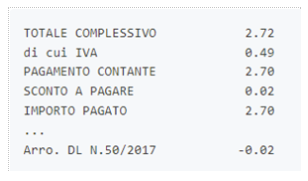
In Italy, 1 and 2 cent coins are no longer in circulation, therefore rounding rules for cash payments must be applied.
Rounding can technically be handled by different systems:
- POS system
- EFR
- fiscal printer
When applying rounding, the following must be considered:
- Only payments may be rounded
- Items and amounts must not be modified
- Rounding applies only to cash payments
Important:
- Card payments or mixed payments (e.g. split payments) must remain exact
- Rounding is applied only within the Pay element
Recommended approach
Since all systems can perform rounding, efsta recommends:
- Either:
- send already rounded amounts from the POS to the EFR, or
- let the EFR handle the rounding automatically
The fiscal printer should not be used for rounding, as it provides the least reliable method.
Option 1: Rounding via POS system
If rounding is performed in the POS system:
- The correct rounded payment amount must be calculated in the POS
- The rounding difference must be printed in the receipt footer

Option 2: Rounding via EFR
EFR supports automatic rounding.
Configuration
- Activate the following attribute:
Fiscal_Rounding
Result:
- The EFR calculates the rounding automatically
- Additional rounding information is inserted
- The correct footer text is generated automatically

Option 3: Rounding via fiscal printer (not recommended)
Although the fiscal printer supports automatic rounding, this method is not recommended.
Reasons:
- Issues can occur with refund processes
- Less control compared to POS or EFR
- Inconsistent results in some cases
Printer rounding settings
If printer rounding is used, the following modes are available:
- 0 – Rounding disabled (default)
- 1 – Full rounding
- 2 – Round down only
- 3 – Round up only
It is recommended to consult your tax advisor when choosing the rounding method to ensure compliance with local regulations.
How does the lottery work?
In Italy, there are two different lottery systems linked to fiscal receipts:
- Instant lottery
- Delayed lottery
Both systems are designed to encourage customers to request and use receipts, supporting compliance with tax regulations.
Instant lottery
The instant lottery is processed automatically by the fiscal printer.
How it works
- A Data Matrix code is printed automatically on the receipt
- Conditions:
- Purchase amount is more than €1
- Payment is made exclusively electronically
Result:
- The customer immediately sees whether a prize has been won
Requirement
For the instant lottery to work:
- The fiscal printer must download lottery codes from theAgenzia delle Entrate
Delayed lottery
The delayed lottery requires active participation from the customer.
How it works
- The customer provides a lottery code
- This code is issued via the official lottery web portal
- The transaction is registered and submitted later
Technical process
- The printer stores participation requests in a special memory
- After:
- 100 requests, and
- a Z-report
the requests are automatically sent to the lottery server
Important requirement
- The company name of the location must be includedwhen sending the lottery data to the tax authorities
Sending the lottery code via EFR
To include a customer's lottery code in a transaction, use:
ESR.Ctm.IT_CodiceLotteria
Example
<Tra>
<ESR>
<Ctm IT_CodiceLotteria="ABCDEFGH"/>
</ESR>
</Tra>
Result:
The transaction is registered for participation in the delayed lottery
Background
The lottery system is used by tax authorities to:
- verify whether receipts are issued and used
- increase transparency in transactions
Instead of:
- on-site inspections (like traditional checks), or
- mandatory registration systems (e.g. in Austria)
What is the "Lotteria degli Scontrini" and is it compulsory in Italy?
The “Lotteria degli Scontrini” is an Italian government initiative designed to encourage consumers to request receipts for their purchases.
It is part of broader efforts to:
- promote the use of traceable payments
- combat tax evasion
- improve overall transparency and tax compliance
Under this program:
- Consumers can participate in a lottery
- Participation is based on the electronic receipt received after a purchase
The receipt serves as the basis for lottery participation.
Is participation mandatory?
- ✅ Merchants are required to issue receipts for all transactions
- ❌ Participation in the lottery is completely voluntary for consumers
Customers are not required to:
- register for the lottery
- actively participate in the program
What type of fiscalization is required in Italy and how can I comply with tax law?
In Italy, fiscalization requires the use of a certified hardware component, the so‑called RT printer (Registratore Telematico).
All POS or PMS systems must be able to work with an RT printer to ensure compliance with Italian tax regulations.
Fiscalization in Italy
Unlike other countries, Italy uses a hardware-based fiscalization system.
This means:
- A certified RT printer is mandatory
- The printer must be:
- registered with the tax authority
- compliant with Italian regulations
Responsible authority:
- Agenzia delle Entrate
Legal requirements
According to Legislative Decree No. 119/2018, merchants in Italy are required to:
- electronically store receipts, and
- transmit daily sales data to the tax authorities
This is typically done via:
- Z-report (daily closing), or
- End-of-Day (EOD) report
Printers
How can I configure printers?
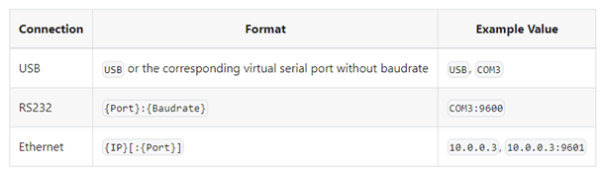
The EFR supports fiscal printing with the EPSON FP‑90III and FP‑81II printers.
These printers can be connected via:
- RS232 cable (serial)
- Ethernet cable
- USB mini-B cable
The configuration must be completed both on the printer itself and in the EFR profile settings.
To configure the printer, connect a keyboard to the USB‑A port of the printer and follow the steps below.
Configuration on the printer
RS232 connection
- When “STATO REGISTRAZIONE” is displayed:
- Enter
3333 - Confirm with
<CHIAVE>or<C>
- Enter
- At “SCELTA FUNZIONE”:
- Enter
17
- Enter
- Navigate to COMPUTER:
- Use the
<x>key on the numeric keypad
- Use the
- Confirm:
<CONTANTE>or<ENTER>
- Check or set the BAUDRATE
- Navigate to CONTROLLO RTS/CTS:
- Press
<CONTANTE>or<ENTER>
- Press
- Set value to:
0(using<x>)
- Confirm:
<CONTANTE>or<ENTER>
- Exit:
<CHIAVE>or<C>
Ethernet connection
- When “STATO REGISTRAZIONE” is displayed:
- Enter
3333 - Confirm with
<CHIAVE>or<C>
- Enter
- At “SCELTA FUNZIONE”:
- Enter
19
- Enter
- Navigate to COMPUTER:
- Use
<x>
- Use
- Confirm:
<CONTANTE>or<ENTER>
- Print Ethernet settings:
<SUBTOTALE>or+
- Exit:
<CHIAVE>or<C>
USB connection
- When “STATO REGISTRAZIONE” is displayed:
- Enter
3333 - Confirm with
<CHIAVE>or<C>
- Enter
- At “SCELTA FUNZIONE”:
- Enter
18
- Enter
- Navigate to COMPUTER:
- Use
<x>
- Use
- Confirm:
<CONTANTE>or<ENTER>
- Exit:
<CHIAVE>or<C>
Configuration in the EFR
After configuring the printer, you must define the connection in the EFR:
- Open the EFR interface:
localhost:5618
- Navigate to the Profile page
- Enter the printer configuration in the field:
Printer Cfg
How does the fiscal printer ordering and setup process work?
efsta supports fiscal printers from:
- EPSON FP‑90III
- EPSON FP‑81II
These printers can only be purchased in Italy via an authorized partner and require a valid Italian VAT ID from an EPSON partner.
Each printer is delivered preconfigured and must be registered with the tax authorities before use.
General information
- Printers are delivered with UID configured by the company
- An annual maintenance inspection is required
- Setup involves both technical configuration and registration with authorities
Standard process (via efsta Portal)
If the printer is ordered via the efsta Portal, the process is handled largely automatically:
- Printer order is placed via efsta Portal
- A technician:
- configures the printer based on the order data
- contacts the customer for confirmation
- The printer is:
- registered online with the tax authorities
- The customer:
- contacts their tax advisor / business consultant
- The tax advisor:
- generates the QR code using the printer’s serial number
- The printer is:
- ready for delivery and operation
This ensures a smooth and compliant setup.
If the printer is purchased via a partner
If the printer is not ordered via the efsta Portal, the marked steps must be handled manually.
This means:
- Configuration must be performed by:
- the partner, or
- a technician
- Registration with tax authorities must be done separately
- Coordination with the tax advisor is still required for QR code generation
Is it mandatory to connect a payment terminal to the RT Printer?
The topic of linking payment terminals with RT printers has been further defined by the Italian authorities and introduces new regulatory requirements.
Regulatory background
The 2025 Budget Law tasked the Italian Revenue Agency (Agenzia delle Entrate – AdE) with defining a regulation to link:
- fiscal printers (RT)
- payment terminals
The goal is to ensure that electronic payments can be properly tracked.
Official regulation
On October 31, 2025, AdE published the official provision:
AdE – New rules effective from Jan 1, 2026
The regulation introduces a:
- logical association between each RT
- and its corresponding payment terminal
How the association works
The linking must be performed by:
- the merchant, or
- their tax advisor
This is done via:
- the Cassetto Fiscale
AdE provides a dedicated function for:
- linking registered RT devices
- and payment terminals
Timeline and deadlines
- The function will be available in March 2026
- After availability:
- merchants have 45 days to register existing terminals
For new terminals:
- registration must be completed
- within the 6th day of the second monthafter the terminal has entered service
Technical limitation
Currently:
- No APIs or external interfaces exist
- The process cannot be automated via systems such as the EFR
The linking must be done manually via AdE systems.
Official reference
For more details, refer to the official AdE page: