efsta-eInvoicing
Configure a Company for Sending E-Invoices
To allow a company to send E-Invoices with the efsta EFR, the configuration of the company’s base data is required. The necessary base data includes:
- Company data
- Location data
- E-Invoicing settings
Details on setting up the necessary company and location configuration can be found in the chapter API - Base data/company header data and Cfg - Configuration.
Setting up the E-Invoicing profile for the sending company
-
Please login to the efsta portal and select the config button on the right side of the company or organization overview:

-
Select the E-Invoice Profile tab and fill out the fields.
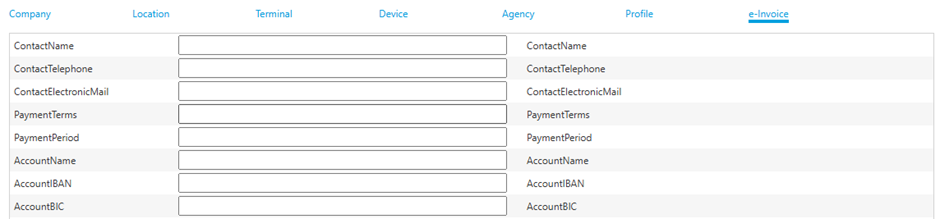 note
noteDepending on the country, there are additional fields at the bottom of this view which need to be filled in as well:
- Germany: peppolSenderID
- Poland: KSeF certificates
-
Save and Send the configuration to the EFR by clicking button SEND CURRENT CFG eDocument”
 tip
tip-
SET DEFAULT CFG
Sets the default configuration and does not send anything to the registers. When a new register is created, it checks if a default configuration exists and, if so, applies it. -
SEND CURRENT CFG
Sends the current configuration to all registers.
-